> ## Documentation Index
> Fetch the complete documentation index at: https://docs.alcmeon.ai/llms.txt
> Use this file to discover all available pages before exploring further.
# Contacts and segments in Simio: fields, tags, and imports
> How Simio stores contacts and custom fields, tags them, groups them into segments, imports up to 100,000 rows from CSV, and enforces per-channel consent.
Simio stores every phone number you can reach as a **contact**, enriches it with custom fields and tags, and lets you build **segments** (rule-based groups) to target campaigns and automations. This page covers the contact model, the CSV import flow, tags and segments, and how consent fits into targeting. For the consent model in detail, see [Consent and opt-in status](/simio/platform/contacts/consent).
## The contact model
A contact has:
* **Phone number** in international format (the primary identifier).
* **Display name**, **first name**, **last name** (populated from imports, integrations, or replies).
* **Custom fields** you define on your company (any extra column you push from a CSV or an integration becomes a field, lowercased and stripped of spaces).
* **Tags**: free-form labels you attach to contacts, most often applied automatically at import time.
* **Consent records** per (channel, messaging account). See [Consent](/simio/platform/contacts/consent).
* **Timestamps**: when the contact was created, when they last messaged you, when their consent last changed.
Contacts are automatically **deduplicated** by phone number. Re-importing an existing contact updates their fields rather than creating a duplicate row.
## Importing contacts from CSV
You can import up to **100,000 contacts per file**. Larger sets have to be split.
### File format
* The first column must be `phoneNumber`, in international format **without the leading `+`** (for example, `33601020304`).
* Column names are case-insensitive and become custom fields with normalized names (lowercase, no spaces).
* Any invalid phone number in the file rejects the **entire file**; nothing is imported.
* Do not rename the required columns or change their order.
Use the [Simio CSV template](https://docs.google.com/spreadsheets/d/1cWC-nPbiUzKAU7UTd-XBh7S0hHXDcLm8_S56Hy3jSmo/edit) as a starting point.
### Import flow
Open the contacts area and upload your CSV file. Simio validates the phone-number column before starting the import.
The import runs in the background. A progress indicator shows how many rows have been processed and surfaces any error message from the parser.
Every import automatically creates a **new tag** named after the file name and the import timestamp, and applies it to every contact in that file. You can optionally add extra tags at import time.
You can check a box to mark every imported contact as **opted in on a specific connected messaging account**. Only do this if you have obtained explicit consent from the contact to be messaged on that account, in a form your legal team can defend.
Once the import is complete, click the action button on the import row to save the import's tag as a **segment** for reuse.
### Deduplication and updates
Re-importing contacts that already exist is safe:
* Existing contacts are matched on phone number and updated with any new field values in the file.
* No duplicate row is created.
* You can re-import the same base to enrich existing contacts with a new custom field (for example, adding a `birthday` column later).
## Tags
Tags are simple labels you attach to any contact. They are created:
* **Automatically at import**, one tag per import (with the file name and timestamp).
* **Manually**, from the contact detail view or in bulk from the contacts list.
* **Through integrations**, for example when a Brevo sync assigns a tag to a synced segment.
Tags are used as a building block for segments.
## Segments
A **segment** is a saved query over your contact list, built from one or more filters. Segments update dynamically: a contact meeting the rules is automatically included; a contact that stops meeting them is automatically excluded.
### Available filters
#### Identity and profile
| Filter | Operators | Value |
| - | - | - |
| **Phone** | `is` / `is not` | One or more phone numbers |
| **Tags** | `contains` / `excludes` | One tag, picked from the dropdown |
| **Custom field** | `is` / `is not` | The field name, then the value to compare against |
| **Coupon** | `has active coupon` / `has no active coupon` | One coupon list, picked from the dropdown |
#### Consent
| Filter | Operators | Value | Scope |
| - | - | - | - |
| **Opt-in status** | `is` / `is not` | `opt-in`, `opt-out`, or `never opt-in` | On a specific WhatsApp or RCS account, or on any WhatsApp account |
See [Consent and opt-in status](/simio/platform/contacts/consent) for what each status means.
#### Dates
Date filters compare a contact's date against either a **specific date** or a **number of days** relative to today.
| Filter | Operators | Value | Scope |
| - | - | - | - |
| **Created** | `more than` / `less than` / `after` / `before` / `on` | Date or number of days | All accounts |
| **Opted-in** | `more than` / `less than` / `after` / `before` / `on` | Date or number of days | On a specific WhatsApp or RCS account |
| **Opted-out** | `more than` / `less than` / `after` / `before` / `on` | Date or number of days | On a specific WhatsApp or RCS account |
| **Birthday** | `more than` / `less than` / `after` / `before` / `on` | Date or number of days | All accounts |
Use `more than` and `less than` with a number of days for rolling windows (for example, contacts created **less than 30 days** ago). Use `after`, `before`, and `on` with a fixed date.
#### Engagement
Engagement filters target contacts based on how they interacted with your messages. Each one is built from four parts:
1. **Event**: the interaction to look for.
2. **Time window**: `over all time`, `more than`, `less than`, `after`, or `before`. Every option except `over all time` takes a date or a number of days.
3. **Frequency**: `at least once` or `zero times`.
4. **Source**: `from any flow`, `from campaign`, `from automation`, or `from chatbot`.
| Event | Matches contacts who... |
| - | - |
| **Received message** | Received a message |
| **Opened message** | Opened (read) a message |
| **Clicked URL** | Clicked a tracked link. |
| **Clicked button** | Clicked a message button |
For example, **Clicked URL**, `less than` `30` days, `zero times`, `from campaign` matches contacts who have not clicked any campaign link in the last 30 days. Use `zero times` to build re-engagement or exclusion segments.
### Combining filters with AND and OR
Filters are organized into **blocks**:
* Inside a block, criteria are combined with **OR**: a contact matches the block if it meets **at least one** of its criteria. Click **Add criteria** next to a block to add an OR condition.
* Blocks are combined with **AND**: a contact enters the segment only if it matches **every** block. Click **Add criteria** under the last **AND** to start a new block.
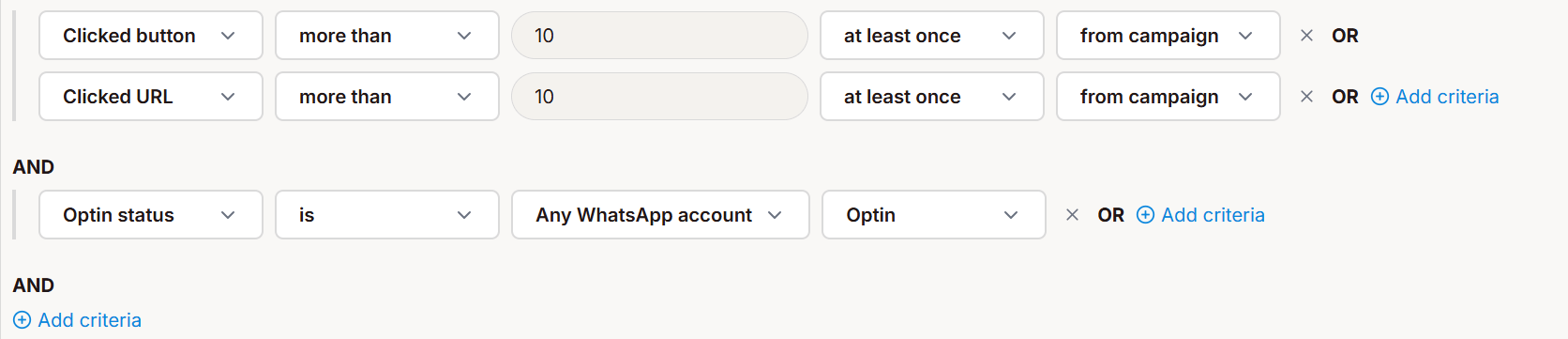 In this example, the segment contains contacts who:
1. Clicked a button **or** a URL from a campaign at least once more than 10 days ago, **and**
2. Are opted in on any WhatsApp account.
## Consent and targeting
When you send a campaign or automation on a specific messaging account, Simio filters the audience against the **consent records for that (channel, account) pair**. A contact who is opted in on account A but not on account B will not receive a send on account B, even if they belong to the targeted segment.
A contact can show up as **"never opt-in"** on an account and still have received Utility messages (order confirmations, service updates) from you, because Utility messages don't require an explicit opt-in on WhatsApp. See [Marketing vs Utility](/simio/channels/whatsapp/templates#marketing-vs-utility-how-meta-classifies-templates). To convert those contacts into opt-ins, add an opt-in step at the end of your Utility flow.
Full model: [Consent and opt-in status](/simio/platform/contacts/consent).
## AI-assisted filters
The contacts list supports natural-language filtering: type a sentence like "customers who bought at least twice this year and opted in on WhatsApp France" and Simio proposes a matching set of rules you can save as a segment. The AI never sends messages on its own; it only proposes segment rules for you to review and confirm.
## Known limitations
* **CSV rejection is all-or-nothing**: a single invalid phone number rejects the entire file. Clean the file and reupload.
* **Import size cap of 100,000 rows per file**. Larger bases must be split into multiple files.
* **No cross-account merge**: two contacts with different phone numbers cannot be merged into one, even if they represent the same person. You can do that kind of operation in your CRM.
* **Free-text search is limited** to phone-number and full name today; searching a partial text, by first name for example, is not possible.
## Related
How per-channel, per-account opt-in status is tracked and enforced.
Assign unique promo codes to contacts inside your messages.
This documentation is built and hosted on [Mintlify](https://mintlify.com), a developer documentation platform.
In this example, the segment contains contacts who:
1. Clicked a button **or** a URL from a campaign at least once more than 10 days ago, **and**
2. Are opted in on any WhatsApp account.
## Consent and targeting
When you send a campaign or automation on a specific messaging account, Simio filters the audience against the **consent records for that (channel, account) pair**. A contact who is opted in on account A but not on account B will not receive a send on account B, even if they belong to the targeted segment.
A contact can show up as **"never opt-in"** on an account and still have received Utility messages (order confirmations, service updates) from you, because Utility messages don't require an explicit opt-in on WhatsApp. See [Marketing vs Utility](/simio/channels/whatsapp/templates#marketing-vs-utility-how-meta-classifies-templates). To convert those contacts into opt-ins, add an opt-in step at the end of your Utility flow.
Full model: [Consent and opt-in status](/simio/platform/contacts/consent).
## AI-assisted filters
The contacts list supports natural-language filtering: type a sentence like "customers who bought at least twice this year and opted in on WhatsApp France" and Simio proposes a matching set of rules you can save as a segment. The AI never sends messages on its own; it only proposes segment rules for you to review and confirm.
## Known limitations
* **CSV rejection is all-or-nothing**: a single invalid phone number rejects the entire file. Clean the file and reupload.
* **Import size cap of 100,000 rows per file**. Larger bases must be split into multiple files.
* **No cross-account merge**: two contacts with different phone numbers cannot be merged into one, even if they represent the same person. You can do that kind of operation in your CRM.
* **Free-text search is limited** to phone-number and full name today; searching a partial text, by first name for example, is not possible.
## Related
How per-channel, per-account opt-in status is tracked and enforced.
Assign unique promo codes to contacts inside your messages.
This documentation is built and hosted on [Mintlify](https://mintlify.com), a developer documentation platform.